Table of Contents
Note:
- This page is rated “PG” / “PG13”.
- Pages beginning with “Avatars” located under the “Shork Industries” / “Avatars” section are rated “PG” / “PG13”unless stated differently in their header.
- All other pages located under the Shork Industries“ / “Avatars” section are rated “Adult” unless stated differently in their header.
- Treat all pages outside the Shork Industries” / “Avatars” section as “Adult” unless stated differently in their header. Viewers discretion is advised.
Shork Avatars
Shork avatars are intended for both normal use as well as learning, how avatars are made and function. As we have no rigger (Feb. 2024) so far, we can't offer an avatar that's mesh, rigged and using the Bento skeleton.
Instead something useful for when you work with the Shork avatars or one day your own components:
To import the meshes correctly into OpenSim / Second Life, you sometimes might have change the import settings. An example can be seen below:
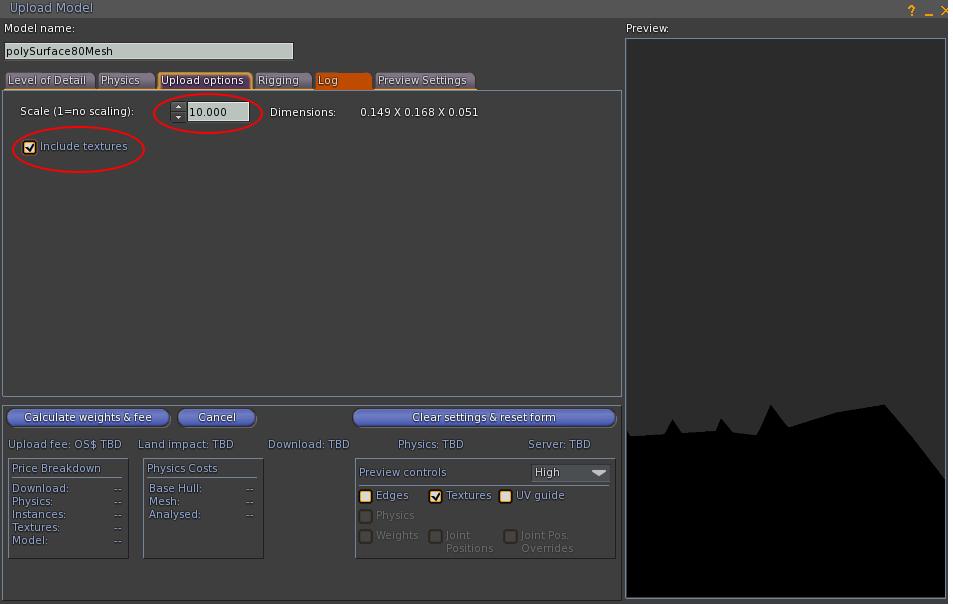
Our first models was made in the size of 28 mm scale (tabletop figurines). On average, we found that the “Scaling Factor” of 10 during import gave perfectly sized components for OpenSim / Second Life.
By now, we try to prepare the packages more thoroughly. As a result, you should always check an avatars pages instructions. In case you're unsure, try importing the mesh parts in OpenSim, find out the perfect settings for your needs, and only then upload them in Second Life.
Scaling issues affect only the Avatars from Ironwood115 (Shark & Lion; Scaling factor x10) and from Silverim ( Dark Dragon and Light Dragon, scaling factor should be fixed ).
Other steps typically include:
- Model Name: Give each component a meaningful name. Their internal names just aren't meaningful. When it is a complete avatar pack, i.e. several components in one package, you have to rename the parts when you “Edit” ⇒ “Unlink” the parts.
- Tab “Upload Options”: Scale: Default Scaling factor is either given on the avatars page, or you can find out your optimum setting by trial-and-error in OpenSim.
- Tab “Upload Options”: Checkbox “Include textures”: Per default, we marked the tickbox. Seriously, none of us knows what actually happens when we do not select it other than that we get white instead of black default meshes in the end. We got that one from a Youtube Video on how to import mesh into Second Life. Some Avatar packs might try to include the textures, but we haven't found out yet how to make that automatic ourselves, so best to assume you'll have to upload the textures later on yourself and apply them.
The UV Maps we provide can be used as a transparent overlay to create your own individualized Skins. Again, for a beginner we recommend to use one of our provided skins and edit it before creating a new one from the ground up..
As a note on the eye textures:
After uploading an eye texture, applying it to an eye of a Shork avatar needs one adjustment:
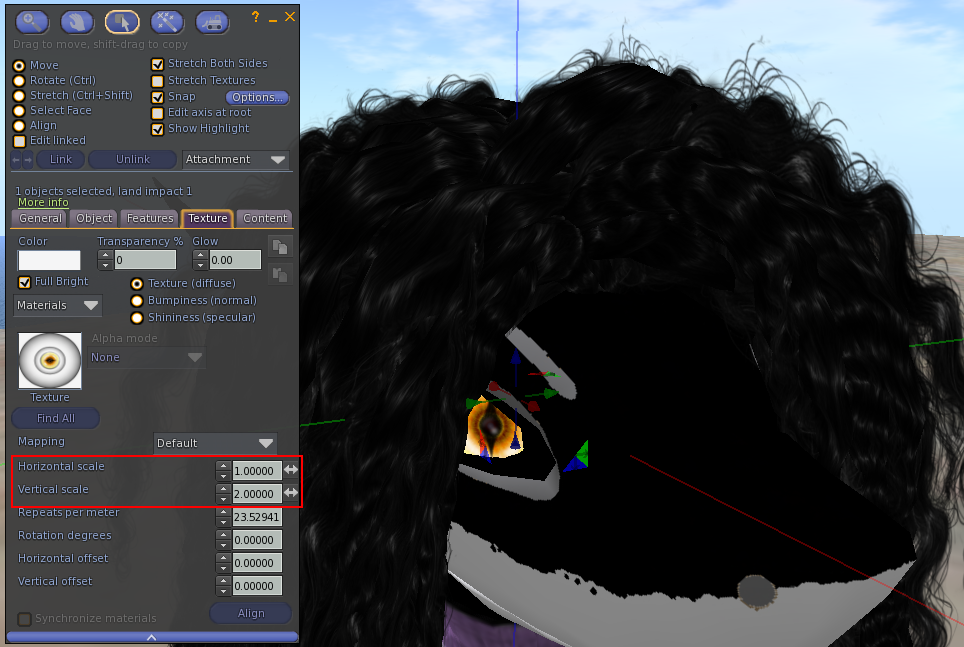
In the Texture tab of the Edit window, “Horizontal Scale” should be equal 1 and “Vertical Scale” should be equal 2.
Again, it just works best this way. When you want a different effect or create your own eye textures, play with these values to find your desired effect.
And yes, it is like this because we somehow made an error and gave up trying to fix it in March 2024. Rotating the image is easy enough and just works.
Shork Industries Scripts
These scripts are the most up-to-date versions of the scripts we actively use:
EarFlick Script - Left
// Earflick / Sliding Door Script (with Euler-degree default rotation)
// Author: Nebadon Izumi (modified 2026 for Earflick function by Yavannah Halostar @ OSGrid & @ Kitely)
// Purpose: Accept object-editor Euler rotation in degrees and restore it on startup.
// Notes:
// - Provide the default rotation as an Euler vector in degrees exactly as shown
//   in the object editor (format: <pitch, yaw, roll>).
// - The script converts that Euler-degree vector to an LSL quaternion rotation
//   using llEuler2Rot and applies it at state_entry so the object always
//   returns to the configured default rotation when the script initializes.

// --------------------------- CONFIGURATION ---------------------------

// Rotation to apply when "open" (degrees and axis).
// For right Ear, use these values:
float RotationAngle = 45.0; // degrees to rotate
vector RotationAxis = <-1, 0, 1>; // rotation axis

// For left Ear, comment the above and uncomment these two lines instead:
// float RotationAngle = 45.0; // degrees to rotate
// vector RotationAxis = <0, -1, 1>; // rotation axis for left ear

float Timer = 1.0; // how long the ear stays "open" before closing (seconds)

// Sound settings (leave empty string "" to disable)
string OpenSound = ""; // opening sound
float OpenVol = 1.0; // opening volume
string CloseSound = ""; // closing sound
float CloseVol = 1.0; // closing volume

// --------------------- DEFAULT ROTATION OPTIONS ----------------------
// Provide the default rotation as Euler angles in degrees exactly as shown
// in the object editor. Example: <0.0, 0.0, 90.0>
//
// Set UseHardcodedDefault = TRUE to use DefaultEulerDeg below.
// Set UseHardcodedDefault = FALSE to auto-detect the current rotation at startup.
integer UseHardcodedDefault = TRUE; // TRUE = use DefaultEulerDeg; FALSE = auto-detect

// Paste the editor Euler vector here (pitch, yaw, roll in degrees).
// Example for 90 degrees around Z axis as shown in the editor: <0.0, 0.0, 90.0>
vector DefaultEulerDeg = <0.0, 0.0, 90.0>;

// --------------------------- INTERNALS -------------------------------
rotation StartRot;         // the rotation considered "closed" / default
rotation RotationOffset;   // rotation to apply when "open"
integer Open = 0;          // 0 = closed, 1 = open

// Helper: degrees to radians
float DEG2RAD = 3.14159265359 / 180.0;

default
{
    state_entry()
    {
        // Determine StartRot from either the hardcoded Euler degrees or the current rotation
        if (UseHardcodedDefault)
        {
            // Convert the editor-style Euler degrees to radians and then to a quaternion
            // llEuler2Rot expects a vector of radians in the order <pitch, yaw, roll>.
            StartRot = llEuler2Rot(DefaultEulerDeg * DEG2RAD);
        }
        else
        {
            // Auto-detect the current local rotation and treat it as the default
            StartRot = llGetLocalRot();
            // Keep DefaultEulerDeg consistent for debugging; convert StartRot back to Euler
            // Note: llRot2Euler returns radians; convert to degrees for DefaultEulerDeg
            DefaultEulerDeg = llRot2Euler(StartRot) / DEG2RAD;
        }

        // Immediately set the object's rotation to the default rotation.
        // This ensures that if the script was interrupted mid-rotation,
        // the object will be restored to its intended default on initialization.
        llSetLocalRot(StartRot);

        // Pre-calc the rotation offset to apply when opening.
        RotationOffset = llAxisAngle2Rot(RotationAxis, RotationAngle * DEG2RAD);

        // Ensure the "open" flag is consistent with the closed StartRot.
        Open = 0;
    }

    // Touch toggles the ear open/closed
    touch_start(integer num)
    {
        Open = !Open; // toggle state

        if (Open)
        {
            if (OpenSound != "") llTriggerSound(OpenSound, OpenVol);
            // Apply the offset relative to the stored StartRot (default).
            llSetLocalRot(StartRot * RotationOffset);
            llSetTimerEvent(Timer);
        }
        else
        {
            if (CloseSound != "") llTriggerSound(CloseSound, CloseVol);
            // Return to the stored StartRot (default).
            llSetLocalRot(StartRot);
            llSetTimerEvent(0);
        }
    }

    // Collision also toggles the ear open/closed
    collision_start(integer num)
    {
        Open = !Open;

        if (Open)
        {
            if (OpenSound != "") llTriggerSound(OpenSound, OpenVol);
            llSetLocalRot(StartRot * RotationOffset);
            llSetTimerEvent(Timer);
        }
        else
        {
            if (CloseSound != "") llTriggerSound(CloseSound, CloseVol);
            llSetLocalRot(StartRot);
            llSetTimerEvent(0);
        }
    }

    // When rezzed, reset the script so state_entry runs and the object
    // is restored to the default rotation.
    on_rez(integer param)
    {
        llResetScript();
    }

    // Timer closes the ear after Timer seconds
    timer()
    {
        if (CloseSound != "") llTriggerSound(CloseSound, CloseVol);
        llSetLocalRot(StartRot);
        llSetTimerEvent(0);
        Open = 0;
    }
}
EarFlick Script - Right
// Earflick / Sliding Door Script (with Euler-degree default rotation)
// Author: Nebadon Izumi (modified 2026 for Earflick function by Yavannah Halostar @ OSGrid & @ Kitely)
// Purpose: Accept object-editor Euler rotation in degrees and restore it on startup.
// Notes:
// - Provide the default rotation as an Euler vector in degrees exactly as shown
//   in the object editor (format: <pitch, yaw, roll>).
// - The script converts that Euler-degree vector to an LSL quaternion rotation
//   using llEuler2Rot and applies it at state_entry so the object always
//   returns to the configured default rotation when the script initializes.

// --------------------------- CONFIGURATION ---------------------------

// Rotation to apply when "open" (degrees and axis).
// For right Ear, use these values:
float RotationAngle = 45.0; // degrees to rotate
vector RotationAxis = <1, 0, -1>; // rotation axis

// For left Ear, comment the above and uncomment these two lines instead:
// float RotationAngle = 45.0; // degrees to rotate
// vector RotationAxis = <0, -1, 1>; // rotation axis for left ear

float Timer = 1.0; // how long the ear stays "open" before closing (seconds)

// Sound settings (leave empty string "" to disable)
string OpenSound = ""; // opening sound
float OpenVol = 1.0; // opening volume
string CloseSound = ""; // closing sound
float CloseVol = 1.0; // closing volume

// --------------------- DEFAULT ROTATION OPTIONS ----------------------
// Provide the default rotation as Euler angles in degrees exactly as shown
// in the object editor. Example: <0.0, 0.0, 90.0>
//
// Set UseHardcodedDefault = TRUE to use DefaultEulerDeg below.
// Set UseHardcodedDefault = FALSE to auto-detect the current rotation at startup.
integer UseHardcodedDefault = TRUE; // TRUE = use DefaultEulerDeg; FALSE = auto-detect

// Paste the editor Euler vector here (pitch, yaw, roll in degrees).
// Example for 90 degrees around Z axis as shown in the editor: <0.0, 0.0, 90.0>
vector DefaultEulerDeg = <0.0, 0.0, 90.0>;

// --------------------------- INTERNALS -------------------------------
rotation StartRot;         // the rotation considered "closed" / default
rotation RotationOffset;   // rotation to apply when "open"
integer Open = 0;          // 0 = closed, 1 = open

// Helper: degrees to radians
float DEG2RAD = 3.14159265359 / 180.0;

default
{
    state_entry()
    {
        // Determine StartRot from either the hardcoded Euler degrees or the current rotation
        if (UseHardcodedDefault)
        {
            // Convert the editor-style Euler degrees to radians and then to a quaternion
            // llEuler2Rot expects a vector of radians in the order <pitch, yaw, roll>.
            StartRot = llEuler2Rot(DefaultEulerDeg * DEG2RAD);
        }
        else
        {
            // Auto-detect the current local rotation and treat it as the default
            StartRot = llGetLocalRot();
            // Keep DefaultEulerDeg consistent for debugging; convert StartRot back to Euler
            // Note: llRot2Euler returns radians; convert to degrees for DefaultEulerDeg
            DefaultEulerDeg = llRot2Euler(StartRot) / DEG2RAD;
        }

        // Immediately set the object's rotation to the default rotation.
        // This ensures that if the script was interrupted mid-rotation,
        // the object will be restored to its intended default on initialization.
        llSetLocalRot(StartRot);

        // Pre-calc the rotation offset to apply when opening.
        RotationOffset = llAxisAngle2Rot(RotationAxis, RotationAngle * DEG2RAD);

        // Ensure the "open" flag is consistent with the closed StartRot.
        Open = 0;
    }

    // Touch toggles the ear open/closed
    touch_start(integer num)
    {
        Open = !Open; // toggle state

        if (Open)
        {
            if (OpenSound != "") llTriggerSound(OpenSound, OpenVol);
            // Apply the offset relative to the stored StartRot (default).
            llSetLocalRot(StartRot * RotationOffset);
            llSetTimerEvent(Timer);
        }
        else
        {
            if (CloseSound != "") llTriggerSound(CloseSound, CloseVol);
            // Return to the stored StartRot (default).
            llSetLocalRot(StartRot);
            llSetTimerEvent(0);
        }
    }

    // Collision also toggles the ear open/closed
    collision_start(integer num)
    {
        Open = !Open;

        if (Open)
        {
            if (OpenSound != "") llTriggerSound(OpenSound, OpenVol);
            llSetLocalRot(StartRot * RotationOffset);
            llSetTimerEvent(Timer);
        }
        else
        {
            if (CloseSound != "") llTriggerSound(CloseSound, CloseVol);
            llSetLocalRot(StartRot);
            llSetTimerEvent(0);
        }
    }

    // When rezzed, reset the script so state_entry runs and the object
    // is restored to the default rotation.
    on_rez(integer param)
    {
        llResetScript();
    }

    // Timer closes the ear after Timer seconds
    timer()
    {
        if (CloseSound != "") llTriggerSound(CloseSound, CloseVol);
        llSetLocalRot(StartRot);
        llSetTimerEvent(0);
        Open = 0;
    }
}
Tailwiggle Bunny
// Tail Wiggle Script for OpenSimulator
// Default rotation: <0,0,90>
// Random wiggles every 30...120 seconds
// Touch = interrupt and excited wagging

rotation gBaseRot;

integer gBusy = FALSE;
integer gTouched = FALSE;

float DEG2RAD = PI / 180.0;

//---------------------------------------------------------

rotation RotOffset(float x, float y, float z)
{
    return llEuler2Rot(<x,y,z> * DEG2RAD);
}

//---------------------------------------------------------

ResetTimer()
{
    llSetTimerEvent(10.0 + llFrand(50.0));
}

//---------------------------------------------------------

SetBaseRotation()
{
    llSetRot(gBaseRot);
}

//---------------------------------------------------------

RotateRelative(float x, float y, float z)
{
    llSetRot(gBaseRot * RotOffset(x,y,z));
}

//---------------------------------------------------------

DoNormalSequence()
{
    integer horizontal = (llFrand(2.0) < 1.0);

    integer angle;

    if (llFrand(2.0) < 1.0)
        angle = 15;
    else
        angle = 30;

    if (horizontal)
    {
        integer i;

        for(i=0;i<3;i++)
        {
            if(gTouched) return;

            RotateRelative(0,0, angle);
            llSleep(0.18);

            if(gTouched) return;

            RotateRelative(0,0,-angle);
            llSleep(0.18);
        }
    }
    else
    {
        integer i;

        for(i=0;i<2;i++)
        {
            if(gTouched) return;

            RotateRelative(angle,0,0);
            llSleep(0.22);

            if(gTouched) return;

            RotateRelative(-angle,0,0);
            llSleep(0.22);
        }
    }

    SetBaseRotation();
}

//---------------------------------------------------------

DoTouchSequence()
{
    integer i;

    for(i=0;i<5;i++)
    {
        RotateRelative(0,0,30);
        llSleep(0.12);

        RotateRelative(0,0,-30);
        llSleep(0.12);
    }

    SetBaseRotation();
}

//---------------------------------------------------------

default
{
    state_entry()
    {
        gBaseRot = llEuler2Rot(<0.0,70.0,0.0> * DEG2RAD);

        SetBaseRotation();

        ResetTimer();
    }

    on_rez(integer n)
    {
        llResetScript();
    }

    timer()
    {
        if(gBusy)
            return;

        gBusy = TRUE;
        gTouched = FALSE;

        DoNormalSequence();

        gTouched = FALSE;
        gBusy = FALSE;

        ResetTimer();
    }

    touch_start(integer total_number)
    {
        gTouched = TRUE;

        SetBaseRotation();

        gBusy = TRUE;

        DoTouchSequence();

        gTouched = FALSE;
        gBusy = FALSE;

        ResetTimer();
    }
}
Facial Expressions System
Facial expressions are provided by a scripted component, named “Eyecontroll (linkset)”, we got from one of our supporters in OpenSim:
Xentor Antarix.
To access its menu, click your Shork avatars nosetip and you'll be prompted by a blue popup requestor window.
Not all expressions work equally well with all avatars due to the different facial geometries.
Instead of writing more, have a short video, recorded by Kute Toodles in OpenSim:
Thanks go to:
- Xentor Antarix @ OpenSim for the Eye Expressions Module
- Kute Doodles @ OpenSim for recording the Video
- Daddy's Music for the royalty free background music and
- Pixabay for the wonderful royalty free content library.
Note: The Expression system is currently only available in OpenSim.
For the already deployed avatars, check the pages listed on he left beginning with “Avatar_” or “Avatars_”.
You may laugh, but we forgot to define exactly how our concurrent documentation processes should actually name the pages, so, as a result we had two people working on it - and two different naming conventions as a result.
Learn from it for your own projects.
Below is the list of the still outstanding, but already planned avatars from Shork Industries for Open Simulator. Some may be available in Second Life, too.
Birds:
- Eagle
- Owl
- Blue-footed Boobie
Vulpines:
- Redfox
- Arctic Fox
- Fennec
Canines:
- Dalmatian
- Golden Retriever
- Husky/Malamute
- German Sheperd
- Border Collie
Lupine:
- Jackal
- Coyote
- North American Wolf
- Timber Wolf
Big Cats:
- Lynx
- Cheetah
Equine:
- Palomino Texture, Brown Texture, White Texture
- “Anthro MLP” style equine ( Pink, Yellow, Blue, Black, White, Violet, Green )
Lapine:
- Alternative Bunny Textures: Grey, Black, White, Mixed
- Angora Bunny ( Floofy Bunny )
Reptiles:
- Gecko ( Various colors )
- Giant girdled lizard
- Comodo Dragon
- Sand Goanna
Amphibians:
- Frog ( Various Species)
- Salamander
- Axolotl


